
Seller inputs
Prepare the listing link, variation notes, FNSKU or unit barcode rules, carton label files, packaging artwork, and any marketplace packaging instructions.
Amazon FBA label & listing guide
For Amazon sellers, the inspection conversation often depends on the details that can be seen on site: the unit, the packaging, the label placement, carton marks, and evidence for the next shipment decision.
Inspection lens
Listing references, FNSKU rules, packaging files, carton requirements, and buyer-approved photos help turn FBA expectations into visible inspection checkpoints.
Business content
This route now focuses on the inspection facts Amazon sellers usually need to compare: listing reference, unit label, carton label, package condition, and evidence for correction before shipment.
Prepare the listing link, variation notes, FNSKU or unit barcode rules, carton label files, packaging artwork, and any marketplace packaging instructions.
Compare the unit, retail package, barcode placement, carton label, carton mark, and accessible dimensions against the buyer-provided references.
Return close photos, scan evidence, carton context, and notes that separate visible findings from marketplace approval assumptions.
This guide now keeps the work centered on the seller's actual order materials instead of abstract listing language.
Identify variation, color, model, accessory, and pack-count points the inspector can compare against the physical unit.
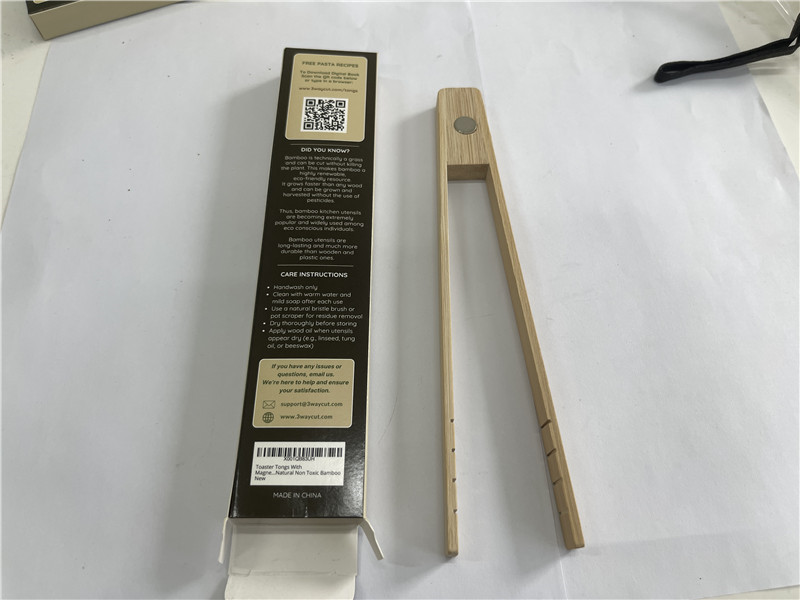
Record FNSKU or buyer-supplied barcode placement on the unit or retail packaging with close photos or scan evidence where available.
Photograph readable carton labels, SKU references, carton count context, and any visible inconsistency before release.
The report can show visible label and carton evidence; it should not claim Amazon approval or guarantee receiving acceptance.
Evidence before assumptions
Use product references, supplier context, accessible conditions, and buyer-defined priorities to decide what should be documented on site. Keep observations separate from assumptions, certification claims, or marketplace approval promises.
See how reports and evidence connectWorkflow connection
Share the product, supplier, timing, and questions that define the visit.
Agree what can be reviewed visibly and which requirements are part of the inspection.
Capture accessible product, packaging, label, or field observations.
Use the English record to guide release, correction, follow-up, or the next visit.
Continue the route
Turn FBA buyer requirements into visible checks.
→ 02 Packaging and label inspectionReview packaging, labels, barcodes, and retail presentation.
→ 03 Pre-shipment checklistPrepare finished-goods, package, label, carton, and evidence checks.
→ 04 English reports and evidenceConnect the inspection visit to a clear record.
→